
Learning how to delete Instagram account is important if you want a clean break from social media, protect your privacy, or simply reduce screen time. Many people feel overwhelmed by constant notifications, comparison pressure, or privacy concerns and decide that leaving is the healthiest choice. In this guide, you will learn the difference between deleting and deactivating, how to back up your data, and the exact steps for phone and computer. We will also cover common mistakes, best practices, real examples, and answers to frequent questions.
Whether you want a temporary break or a permanent removal, this article walks you through everything in simple language. You will discover what happens to your photos, messages, and followers after deletion, how to prepare your account, and what alternatives you can try before making a final decision.
Why People Choose To Delete Instagram Account
Many users decide to remove their profiles because social media starts affecting their mental health, productivity, and self-esteem in quiet but powerful ways.
Constant scrolling, comparison with others, and pressure to post can create stress and anxiety. Taking a step back often brings more focus, better sleep, and improved mood.
Privacy is another major reason. People worry about data tracking, targeted ads, unwanted followers, and old posts that no longer reflect who they are today.
Some users leave for professional reasons. They want to clean up their online presence, change careers, or build a new personal brand without old content holding them back.
The good news is that you have options. You can download your data, inform contacts, and choose between temporary deactivation and permanent deletion based on your long term goals.
Delete Instagram Account Versus Deactivate
Before you proceed, it is important to know the difference between permanent deletion and temporary deactivation because they have very different results.
1. Permanent Removal Of Profile
When you delete your account permanently, your profile, photos, videos, comments, likes, and followers are removed for good. After the grace period ends, you cannot recover anything, and your username may become available for others to use in the future.
2. Temporary Suspension Of Profile
Deactivation hides your profile, photos, comments, and likes temporarily without erasing them. Other people cannot find or view your account while it is disabled, but everything is restored exactly as it was when you log back in again.
3. Time Limit For Recovery
Deletion usually includes a waiting period of about thirty days before data is fully erased. If you log back in during that window, you can cancel the request. Deactivation has no strict time limit, and you can return whenever you feel ready to use Instagram again.
4. Impact On Username And Followers
After permanent deletion, you may lose your username, and followers will no longer see your account in their lists or searches. With deactivation, your username is reserved for you, and followers remain intact, although they cannot interact with your hidden content temporarily.
5. Effect On Messages And Comments
Deleted accounts gradually remove your comments and likes, while direct messages you sent may still appear in other人的 inboxes but without your profile picture. Deactivated accounts simply hide your activity, and everything reappears normally once you reactivate your profile again.
6. Best Choice For Your Situation
Choose deletion if you want a fresh start, stronger privacy, or freedom from social media for good. Choose deactivation if you need a short break, want to focus on work or studies, or feel unsure about losing memories, contacts, and business connections permanently.
Backup Your Instagram Data Before Deletion
Save your memories and important information first so you do not lose photos, contacts, or messages you may need later.
- Request Data Download: Go to settings, privacy, and look for data download option to request a copy of photos, videos, and profile details.
- Save Photos Manually: Save favorite posts, stories highlights, and reels to your phone gallery or computer for quick offline access.
- Copy Follower List: Note down important friends, clients, and creators so you can reconnect through email or other platforms later.
- Save Login Details: Keep a record of linked email, phone number, and connected apps to resolve future login or security issues.
- Disconnect Third Party Apps: Remove Instagram access from shopping sites, editing tools, and scheduling apps to protect your information.
- Inform Contacts: Tell close friends, customers, or followers where to reach you next, especially if you use the account for business.
- Check Business Content: Download insights, ad receipts, and branded content files if you run promotions or work with sponsors online.
How To Delete Instagram Account On Phone
Most people use the mobile app, and you can start the deletion process right from your account settings in a few minutes.
1. Open Profile Settings Menu
Open the Instagram app and tap your profile picture at the bottom right corner. Tap the three lines at the top right, then choose Settings and privacy. This menu contains all controls for account management, security, personal details, and privacy preferences in one convenient place.
2. Go To Accounts Center
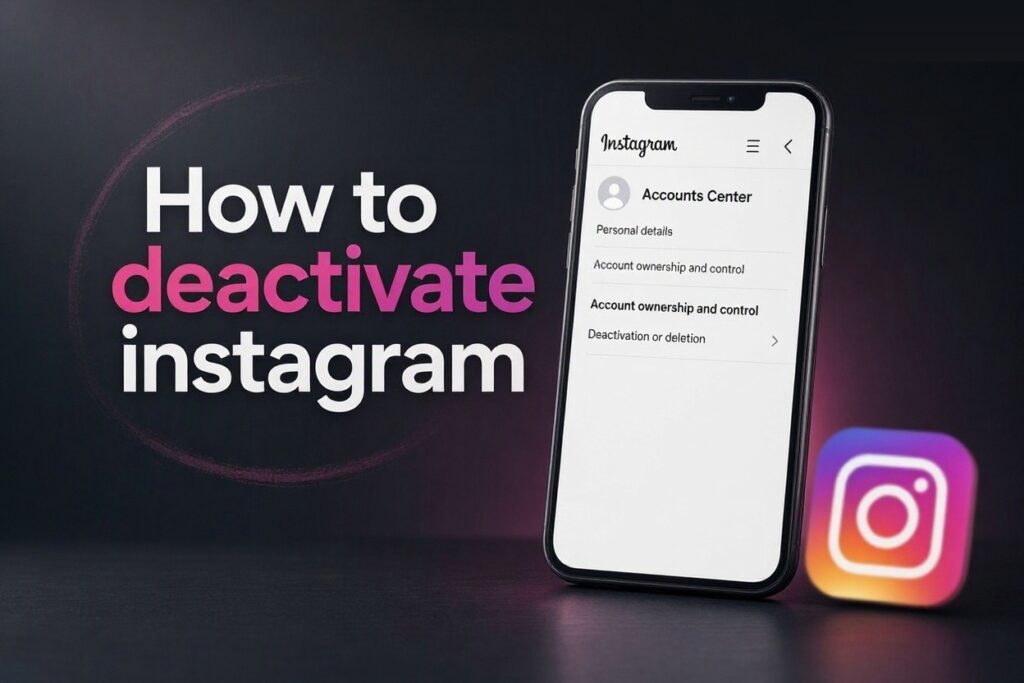
Tap Accounts Center at the top of the settings page to manage connected profiles and personal information. This central hub controls login details, personal data, and deactivation or deletion options for Instagram and other linked accounts you may own.
3. Select Personal Details Option
Inside Accounts Center, tap Personal details and then choose Account ownership and control. This section lets you manage memories, deactivate profiles temporarily, or move forward with permanent removal when you are completely sure about your decision.
4. Choose Deactivation Or Deletion
Select the correct Instagram profile if you manage multiple accounts. Then tap Deactivation or deletion and choose Delete account for permanent removal. Read the on screen explanation carefully so you fully understand what data will be lost.
5. Confirm Reason And Password
Instagram will ask why you are leaving and require your password to confirm your identity. Select a reason from the list, re enter your password, and review the warning about losing photos, followers, and messages before you tap the final confirmation button.
6. Complete Final Confirmation Step
After confirmation, your account is scheduled for deletion and hidden from others. Avoid logging in unless you want to cancel the request. After about thirty days, the account and most associated data are permanently removed and cannot be restored.
How To Delete Instagram Account On Computer
If you prefer a larger screen, the desktop process is simple and gives you more control when reviewing settings and downloading data.
1. Log In Through Browser
Open your preferred web browser and log in to your Instagram account using your username and password. Make sure you are using the correct profile, especially if you manage personal and business accounts, to avoid accidentally deleting the wrong account.
2. Access Settings And Privacy
Click your profile picture in the lower left corner, then select Settings from the menu. Open Accounts Center from the sidebar to find centralized controls for personal details, passwords, and account ownership across all connected profiles.
3. Open Account Ownership Controls
In Accounts Center, select Personal details and then click Account ownership and control. This area explains your choices clearly and helps you decide between a temporary break and full deletion based on your privacy needs and future plans.
4. Pick Profile For Removal
Choose the Instagram account you want to remove from the list of profiles. Click Deactivation or deletion, then select Delete account and press Continue. Double check the username shown on screen to confirm you selected the right one.
5. Provide Reason For Leaving
Select a reason for deletion from the dropdown menu, enter your password when prompted, and review the information about data loss. This step protects your account from unauthorized deletion and gives Instagram feedback about why users choose to leave.
6. Confirm Deletion Request
Click Delete to submit your request. Your profile will be hidden immediately and scheduled for permanent removal. Do not log back in during the grace period unless you change your mind and want to keep your photos and connections.
Key Instagram Account Deletion Factors
Consider these important points before you confirm deletion so you do not lose valuable content or business connections.
- Data Loss: Photos, reels, stories, and messages will be erased and cannot be restored after the grace period ends.
- Business Impact: Shops, promotions, and customer chats linked to your profile will stop working immediately.
- Username Availability: You may not get the same username again if someone else claims it after release.
- Linked Accounts: Logins using Instagram for other apps or sites may fail and need new setup.
- Emotional Readiness: Make sure you are prepared to lose memories, contacts, and daily interactions.
- Alternative Options: Consider deactivation, muting, or limiting time if full deletion feels too extreme.
Common Instagram Account Deletion Mistakes To Avoid
Many people rush the process and lose important data. Avoid these errors to make your exit smooth and stress free.
1. Deleting Without Data Backup
One of the biggest mistakes is deleting without downloading photos, videos, and messages first. Once the grace period passes, recovery is impossible. Always request your data file, save important media manually, and store contacts elsewhere before you confirm permanent removal.
2. Forgetting Linked Business Tools
Many creators link Instagram to shops, ad accounts, and scheduling tools. Deleting without disconnecting these services can disrupt orders, lose insights, and cause login errors. Review connected apps and transfer business assets to another profile or platform in advance.
3. Choosing Wrong Account Profile
People with multiple accounts sometimes delete the wrong one. Always verify the username, profile picture, and email before confirming. Log out of extra accounts if needed and complete the process on only the profile you truly want to remove permanently.
4. Ignoring The Grace Period
Some users log back in out of habit, which cancels the deletion request automatically. If you are serious about leaving, remove the app from your phone, log out on all browsers, and avoid clicking Instagram links until the waiting period is fully over.
5. Not Informing Followers
Disappearing without notice can confuse friends, customers, and collaborators. Post a brief goodbye story, share alternative contact details, and reply to pending messages. This simple step preserves relationships and protects your professional reputation.
6. Skipping Password Recovery Steps
Trying to delete an old account without updating the email or phone number first often leads to failure. Make sure you can log in, reset your password if needed, and turn off two factor authentication issues before starting deletion so the process completes without delays.
Best Practices For Instagram Account Deletion
Follow these smart practices to protect your privacy, save memories, and leave Instagram with confidence.
1. Download Complete Data Archive
Request your full information file at least a few days before deletion. This archive includes photos, videos, comments, profile details, and more. Store it safely on your computer or cloud storage so you can revisit memories or prove ownership of content if needed later.
2. Clean Up Personal Information First
Before deleting, remove your phone number, email, bio links, and connected contacts from the profile. Edit or delete sensitive posts manually. This reduces the amount of personal data stored during the grace period and improves your overall privacy and security.
3. Notify Important Contacts Early
Make a list of close friends, family, clients, and community members. Send them your email, phone number, or new social handle. If you run a business, update your website and other social profiles so customers can still find and contact you easily.
4. Review Connected Logins Carefully
Check which apps and websites use Instagram for login. Switch them to email or another social login before deletion. This prevents being locked out of shopping accounts, games, or productivity tools that depend on your Instagram credentials for access.
5. Try A Short Break First
If you feel unsure, deactivate temporarily or log out for two weeks instead of deleting immediately. Notice how your mood, focus, and free time change. Many people discover that a short break gives clarity and helps them decide whether permanent removal is truly necessary.
6. Secure Account Until Removal
Change your password to something strong, enable extra security, and log out from all devices except the one you use for deletion. This prevents unauthorized access or accidental cancellation during the waiting period and ensures only you control the final outcome.
Practical Instagram Account Removal Use Cases
Different people delete for different reasons. These real life situations show when permanent removal makes sense.
1. Focus On Mental Health Recovery
Students and young professionals often delete to escape comparison, negative comments, and endless scrolling. Removing the app helps reduce anxiety, improve sleep, and create space for hobbies, exercise, and real life friendships that support emotional well being and personal growth.
2. Career Change And Rebranding
Job seekers and entrepreneurs sometimes remove old casual content before applying for jobs or launching a new brand. Starting fresh allows them to build a professional image elsewhere without past posts, tags, or comments affecting interviews or business opportunities.
3. Protecting Child And Family Privacy
Parents often delete family accounts to protect children from strangers, unwanted messages, and data collection. They prefer private photo sharing through secure albums or messaging apps where only trusted relatives can view personal moments and milestones safely.
4. Reducing Business Distractions
Small business owners who relied too much on social media marketing may delete a distracting personal account to focus on work. They keep only a managed business profile or move to email and search marketing for more stable and less stressful customer growth.
5. Cleaning Up Fake Or Extra Accounts
Many users create second accounts for testing, fan pages, or old projects and later forget about them. Deleting unused profiles reduces security risks, prevents impersonation, and simplifies login management by keeping only one active and meaningful account.
6. Digital Minimalism Lifestyle Choice
Followers of simple living often delete Instagram to spend less time online and more time offline. They keep in touch through calls, texts, and in person meetings. This choice supports deeper focus, stronger relationships, and greater control over personal attention and time.
What Happens After You Delete Instagram Account
Knowing what to expect afterward helps you plan better and avoid surprises during the waiting period.
Profile Visibility: Your profile becomes hidden right away and others cannot find you through search, tags, or follower lists.
Grace Period: You have about thirty days to change your mind by simply logging back in and canceling the request.
Data Erasure: After the waiting period, photos, videos, likes, and most account data are permanently removed from servers.
Messages Retention: Messages you sent may still show in other users chats, but without your name or profile link attached.
Username Status: Your old username may become available again, so there is no guarantee you can reuse it later.
Third Party Effects: Embedded posts on blogs stop working, and apps connected through Instagram login lose access.
New Account Option: You can create a fresh account later with the same email, but previous content and followers will not return.
Frequently Asked Questions
1. How Long Does It Take To Delete Instagram Account Permanently
Your profile is hidden immediately after confirmation, but full deletion usually takes about thirty days. If you log in during this time, the request is canceled. After the period ends, most data is erased permanently and cannot be recovered by you or support.
2. Can I Recover My Instagram Account After Deletion
You can only recover during the grace period by logging back in. Once the thirty day window passes, recovery is not possible. Your photos, followers, and messages are gone. If you want to return later, you must create a brand new account from scratch.
3. Will My Messages Disappear After I Delete My Account
Your profile disappears, but messages you sent may remain visible to recipients. They will appear without your profile picture or clickable username. Comments and likes are generally removed over time as systems update after permanent deletion is complete.
4. Can I Use The Same Username Or Email Again
You can often reuse the same email for a new account, but the same username is not guaranteed. After deletion, usernames may be taken by others or held by the system. Choose a new variation quickly if you plan to return with similar branding.
5. Is Deactivating Better Than Deleting Instagram
Deactivation is better if you need a short break or feel unsure about permanent loss. It hides everything temporarily and restores it on login. Deletion is better if you want privacy, a fresh start, or freedom from social media without plans to return soon.
6. Do I Need The Password To Delete My Account
Yes, you must log in and confirm your password to delete for security reasons. If you forgot it, reset it through email or phone first. Make sure two factor codes work and your contact details are current so you can complete verification without delays.
Conclusion
Deciding how to delete Instagram account is a personal choice that affects your memories, connections, and online privacy. By backing up data, informing contacts, and following the correct steps on phone or computer, you can leave smoothly without stress or regret.
Whether you choose temporary deactivation or permanent deletion, take time to reflect on your goals. A thoughtful break from social media can bring more focus, peace, and control over your digital life moving forward.

Discussion